How-to 10 of 31 · Storykeeper · Share
Choose who can see a memory
When a memory is ready for the family, or for only some of the family.
- Find the memory in the Memories tab.Under each card is a small badge: Not yet shared, or Shared with 3 people.
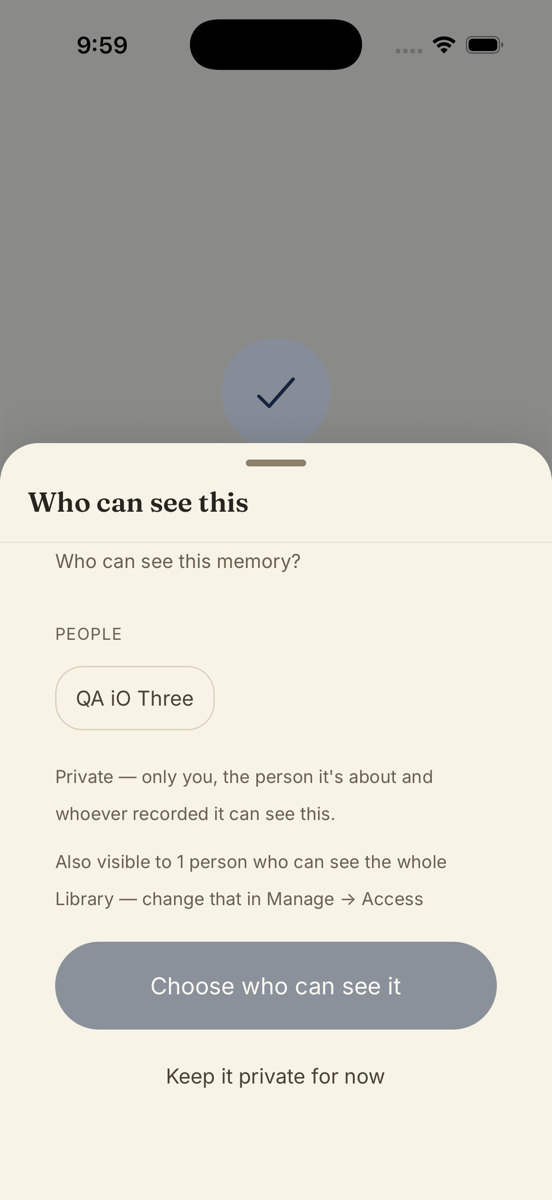
- Tap the badge.A sheet called Who can see this opens.
- Tap the people or groups you want.Chips under Groups and People. A chip lights up when chosen. The line underneath keeps count: “Shared with 4”.
- Tap Save.The badge on the card updates. Anyone you chose can watch it now.
Good to know. Every memory starts private. The sheet says so: private means only you, the person it is about and whoever recorded it can see it. Right after you record one yourself, Nenapu asks Who can see this memory? so you can decide on the spot.
Good to know. If the sheet says there is no one to add yet, use the Invite family & friends button on it. Some people may already see everything: the sheet notes “Also visible to 2 people who can see the whole Library”, which you change under Manage → Manage access.
Stuck anywhere? Write to [email protected] — a person answers.