How-to 12 of 31 · Storykeeper · Share
Invite someone to watch
When someone wants to watch the memories but has no questions to ask.
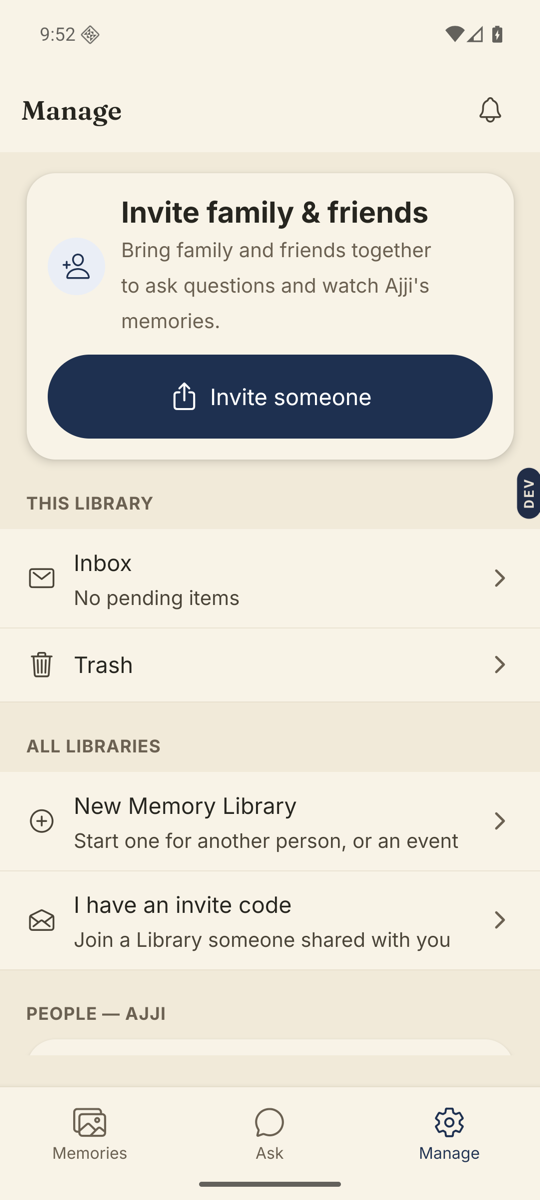
- Open the Manage tab and tap Invite someone.It is on the Invite family & friends card near the top.
- Under “What can they do?” tick Can watch & comment.Leave Can ask questions unticked if they should only watch.
- Under “What can they see?” choose their starting view.Nothing yet: they join and see nothing until you share something. The whole Library: every memory, including future ones. Or one of your groups.
- Add a name and email if you like, then tap Send invite.“Who is this for?” is optional. So is the email.
- Give them the code.The screen shows a QR to scan, an Invite code, and Share invite link. Tell them: open Nenapu, tap I have a code, and enter it.
Good to know. Nothing yet is the safest start. You can share a collection, a group, or single memories with them at any time afterwards.
Good to know. Until they join, they sit under Pending invites marked “Invited, not joined yet”, with Edit, Share again and Remove.
Stuck anywhere? Write to [email protected] — a person answers.