How-to 6 of 31 · Storykeeper · Record
Share a memory of them yourself
When you have a story about them that only you can tell, or a moment worth keeping in your own words.
- Open the Memories tab and tap Record a memory.It is the wide button along the bottom of the screen.
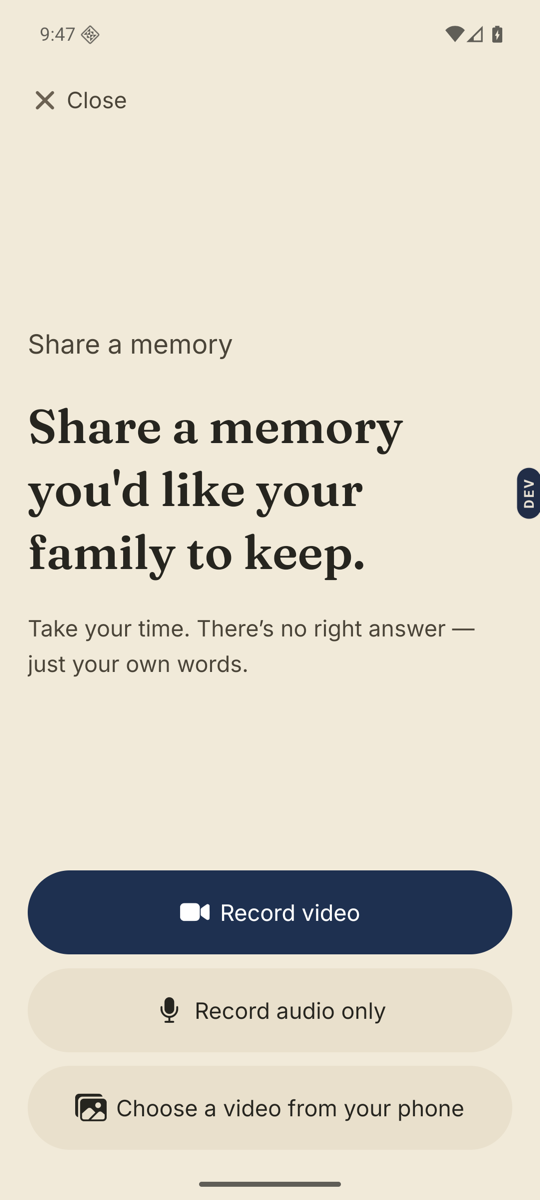
- Pick how you want to record.The screen says Share a memory, with “Take your time. There’s no right answer.” Choose Record video, Record audio only, or Choose a video from your phone. Photos are added at the Review step.
- Set up and record.For video you see Set up your video with Selfie or Rear, zoom and a light. Tap Start recording, then Stop when you are done. You can Pause on the way.
- Review it.Play it back. Add a title & note names the memory so the family can find it. Re-record starts over. Discard throws it away.
- Tap Send.Then choose who can see it when the Who can see this memory? prompt appears, or tap Keep it private for now.
Good to know. There is a second door. On the Ask tab, Share a memory of Amma opens a quick video or voice recorder about them. That one saves privately at first: open the memory afterwards to choose who else can see it.
Good to know. Your memories count against the same 2 hours of recording time as theirs. Manage that under Recording time and add-ons.
Stuck anywhere? Write to [email protected] — a person answers.