How-to 8 of 31 · Storykeeper · Record
Add a photo or a note to a memory
When a story needs the photograph it is about, or a line of context for whoever watches it later.
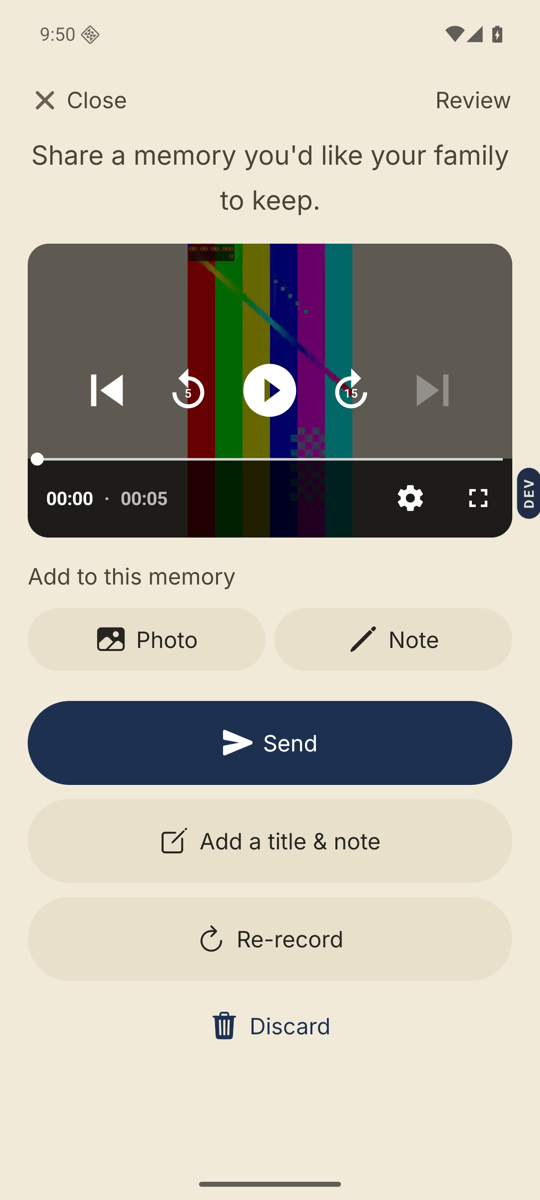
- Record as usual, then stop at the Review screen.Below the playback you see “Add to this memory” with two buttons: Photo and Note.
- Tap Photo.A sheet called Add a photo offers Take a photo or Choose from library. You can add several. Each shows as a small square; the x in its corner removes it.
- Tap Note.A Write a note sheet opens. Type, then tap Add note.
- Give it a name if you like.Add a title & note opens a Title and an optional Description. Titles make memories easy to find and to sort.
- Tap Send.Photos and notes upload with the recording. In the player they sit behind the Also shared with this memory button.
Good to know. Already sent it? Open your own memory in the player and tap the plus circle on the right. Write a note is there, alongside recording another video or a voice note. This works only on memories you recorded yourself.
Stuck anywhere? Write to [email protected] — a person answers.