How-to 7 of 31 · Storykeeper · Record
Use a video already on your phone
When the moment already happened and the video is sitting in your gallery.
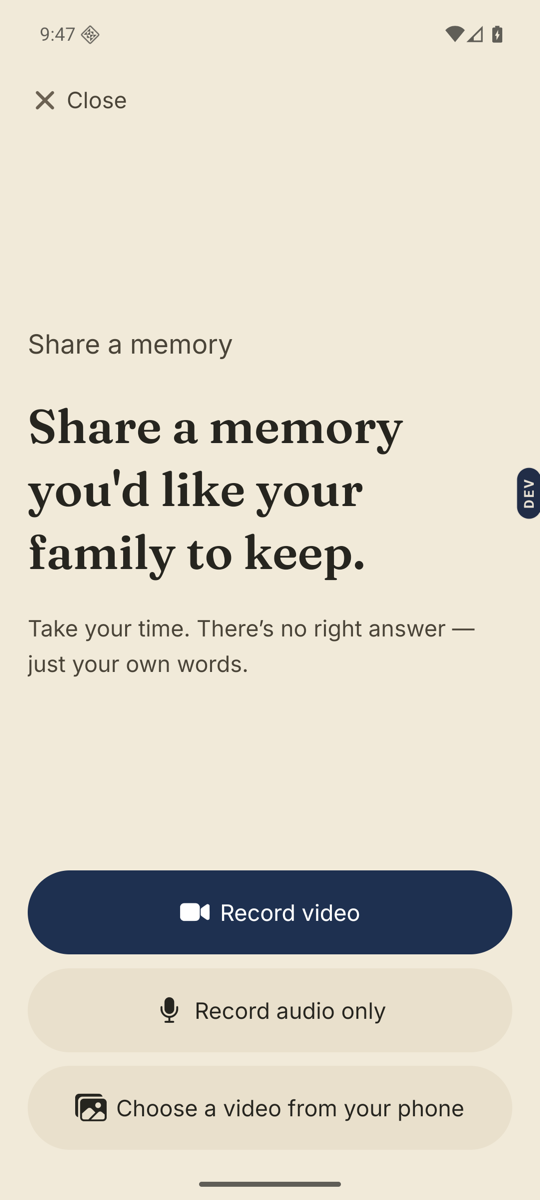
- Open the Memories tab and tap Record a memory.The wide button along the bottom.
- Tap Choose a video from your phone.It is the third option, under Record video and Record audio only. Your phone’s own picker opens.
- Pick the video.It comes back to the Review screen just as if you had recorded it. You can Add a title & note here.
- Tap Send.Longer videos take longer to upload. Stay on Wi-Fi if you can. Then choose who can see it.
Good to know. Nenapu checks the length before sending. If the video runs longer than the recording time left in the Library, you see “That video is longer than the time left” with the two numbers, and Choose another video. Nothing is uploaded until it fits.
Stuck anywhere? Write to [email protected] — a person answers.