How-to 3 of 31 · Storykeeper · Ask
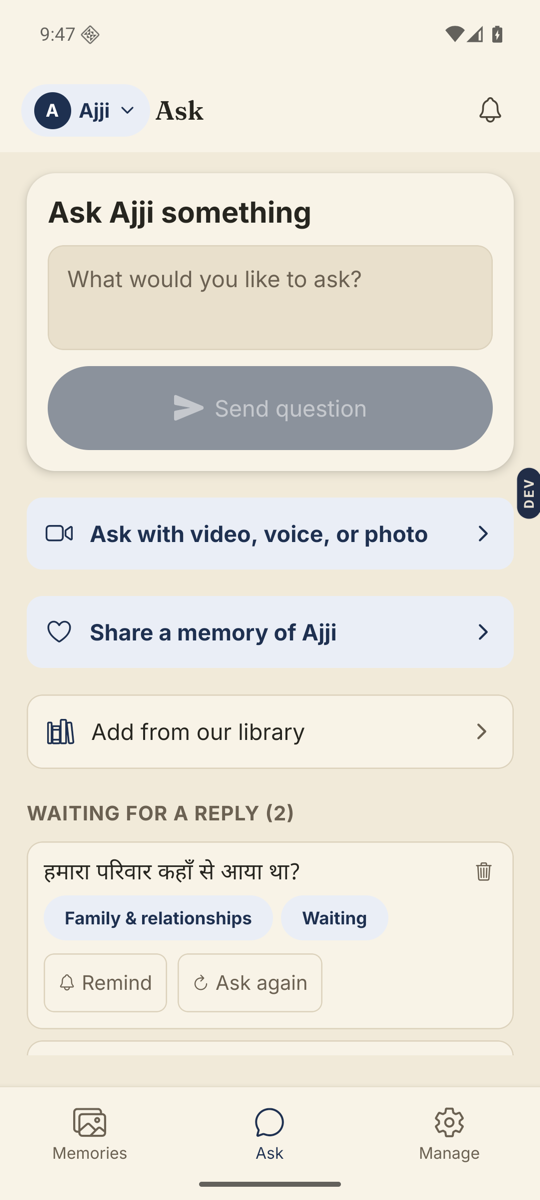
Ask with a video, voice note, or photo
When a face and a voice will draw out more than a line of text, or a photo is the whole question.
- Open the Ask tab and tap Ask with video, voice, or photo.It is the highlighted row with a camera icon.
- Pick how you want to ask.Three tabs at the top: Video, Voice, Write. Video and Voice will ask for camera or microphone permission the first time.
- Record, or write.For Video and Voice, tap Start recording, then Stop recording. Flip camera switches to selfie or rear. In Write, type under “Your question” and use Add a photo if you want one attached.
- Check it, then send.You can add an optional label for the queue, or tap Re-record. When it is right, tap Send to Amma.
- Done.You see “Question sent to Amma. They will see it when their next questions are delivered.”
Good to know. A video or voice question plays for them first, then hands off to their answer. In the Memories tab, that answer opens with a small chip that says The question.
Good to know. The first time you send one, Nenapu may ask “Want to know when Amma answers?” Tap Turn on notifications if you would like a note when the reply arrives.
Stuck anywhere? Write to [email protected] — a person answers.