How-to 2 of 31 · Storykeeper · Ask
Add questions from the library
When you have run out of ideas, or want the questions that tend to bring out the best stories.
- Open the Ask tab and tap Add from our library.It is the row with the small library icon, under the question box.
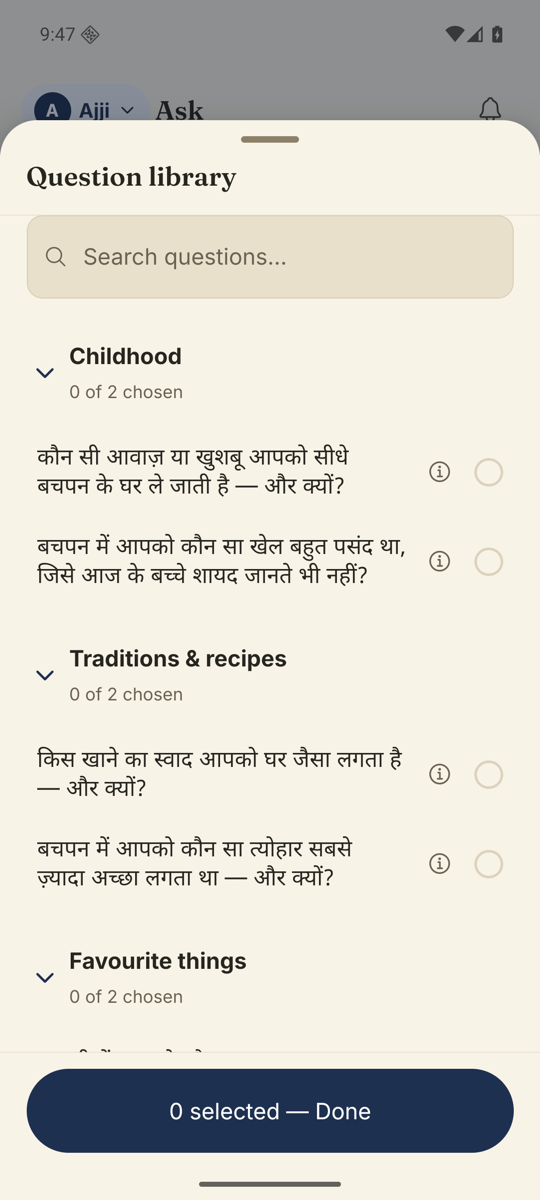
- Browse by theme, or search.The Question library sheet groups questions under Childhood, Family & relationships, Career & vocation and five more. The search box at the top says “Search questions…”
- Tap a question to choose it.Each theme shows how many you have picked, for example “3 of 12 chosen”.
- Change the wording if you like.Tap the small info circle on a question to open it, then use Adjust wording (optional). Your version is used instead of the original.
- Tap Done.The button at the bottom counts as you go, for example “4 selected”. The questions join the queue in the language you chose for them.
Good to know. The library is written for one person’s life story, so it is not offered on an event Library. Events use your own questions.
Stuck anywhere? Write to [email protected] — a person answers.