How-to 4 of 31 · Storykeeper · Ask
Send a reminder, or ask again
When a question has been sitting under Waiting for a reply longer than you hoped.
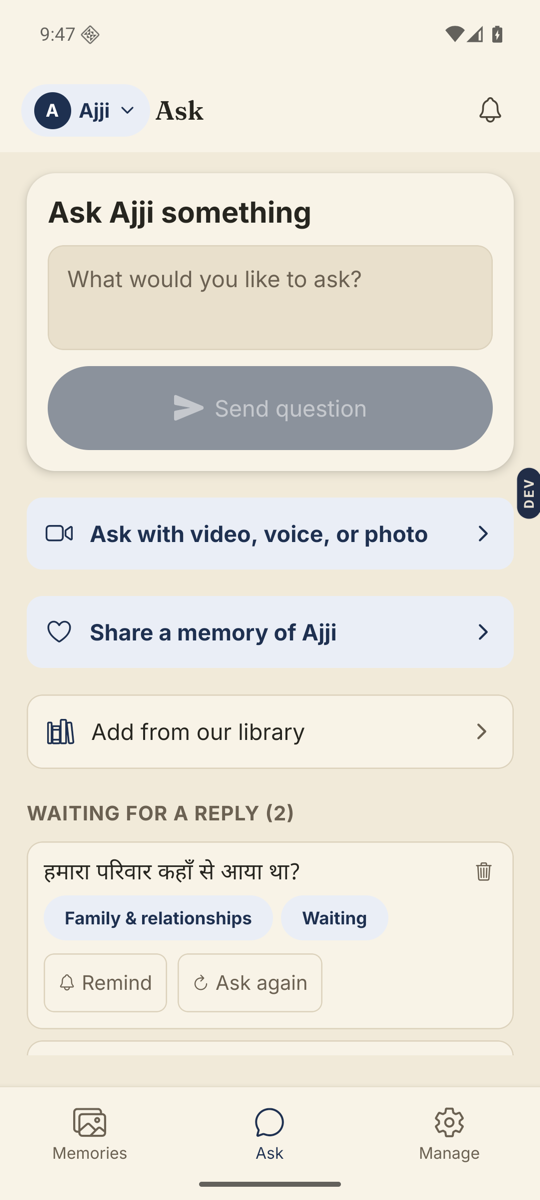
- Open the Ask tab and look under Waiting for a reply.Only questions already on their phone show the two buttons: Remind and Ask again.
- Tap Remind to nudge them.A sheet called Send a reminder opens. It explains that this sends a notification in their app, with no texts or phone calls. Tap Send reminder now.
- Watch for the confirmation.“Reminder sent”. If their phone is not reachable right now it says the reminder is saved and they will receive it when they open the app.
- Tap Ask again to deliver the question afresh.It is delivered to their phone again, straight away. You get a small “Sent again.”
Good to know. Ask again only works while the question has no answer. If they have answered it, you will see “This question already has an answer.” To get a second take, move that answer to Trash first, then Ask again.
Good to know. For a general nudge that is not about one question, use Manage → Send a reminder.
Stuck anywhere? Write to [email protected] — a person answers.