How-to 19 of 31 · Storykeeper · Family
Send a new sign-in code to the elder
When they lost the code, the code stopped working, or the app came off their phone.
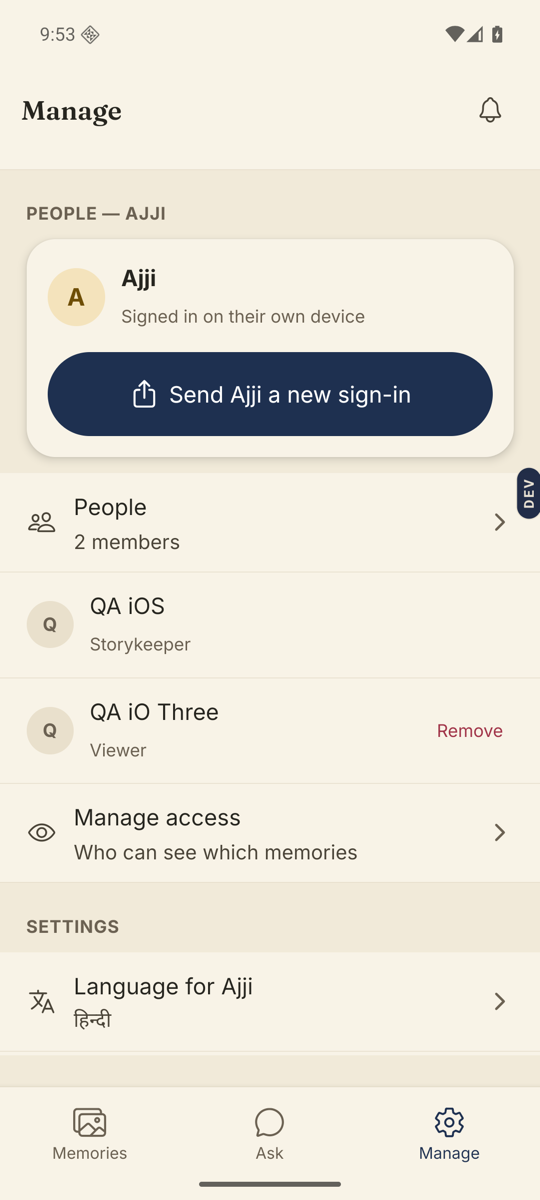
- Open the Manage tab and find their card under People.It shows their name and either “Hasn’t joined yet” or “Signed in on their own device”.
- If they have not joined, share the code again.The card shows Amma’s code and “Works until” a date. Tap Share Amma’s link again to send it by WhatsApp, or just read out the six numbers.
- If it says “This code has stopped working”, tap Get a new code.A fresh code appears on the same card.
- If they already joined but lost access, tap Send Amma a new sign-in.The card explains: “If Amma reinstalled the app or changed phone, send this. Their recordings stay exactly as they are.”
Good to know. On their phone the steps are the same either way: open Nenapu, tap I have a code, type it in. No password, no account.
Stuck anywhere? Write to [email protected] — a person answers.