How-to 15 of 31 · Storykeeper · Organise
Make a collection
When you want Amma's childhood in one place, or the ones meant for the grandchildren.
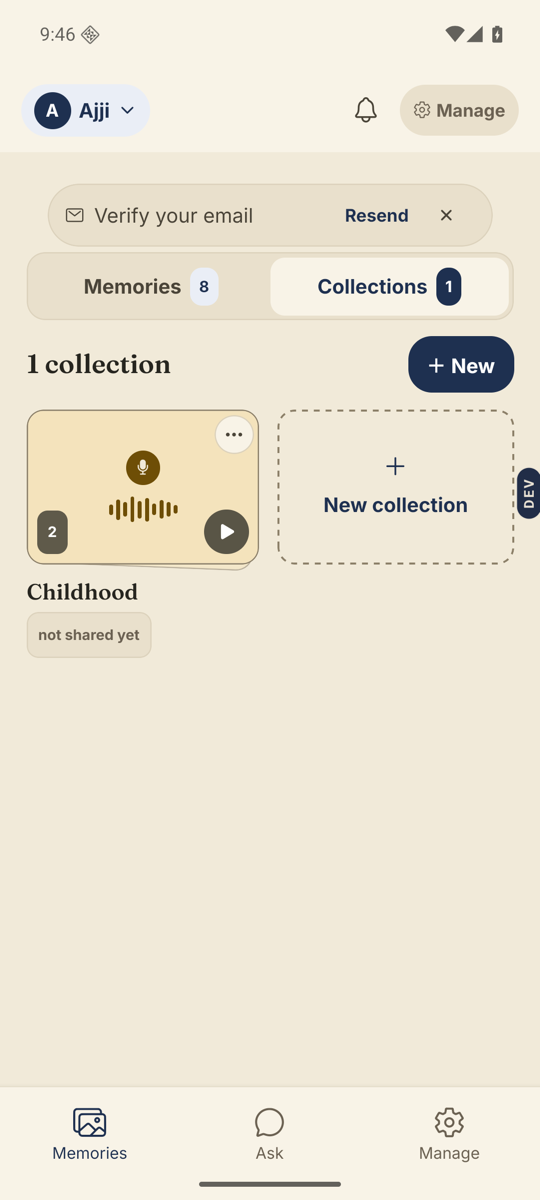
- Open the Memories tab and switch to Collections.The two views sit side by side at the top.
- Tap + New.A New collection sheet asks for a name. Type one, such as Childhood, and tap Create collection.
- Open it and tap Add memories.Tap the memories you want. When every memory is already in, it says so.
- Put them in order.On each row, Move up and Move down. Take out of this collection removes one without deleting it.
- Rename or delete from the card.Back in the Collections view, the three dots on a card offer Rename, Choose who can see it, and Delete collection. Deleting a collection never deletes the memories in it.
Good to know. A memory can live in as many collections as you like. Filtering the Memories tab by “In a collection” shows what is where.
Stuck anywhere? Write to [email protected] — a person answers.