How-to 5 of 5 · Family · Joining in
Ask them a question
You write it. They see it in big type, in their language, and answer by talking.
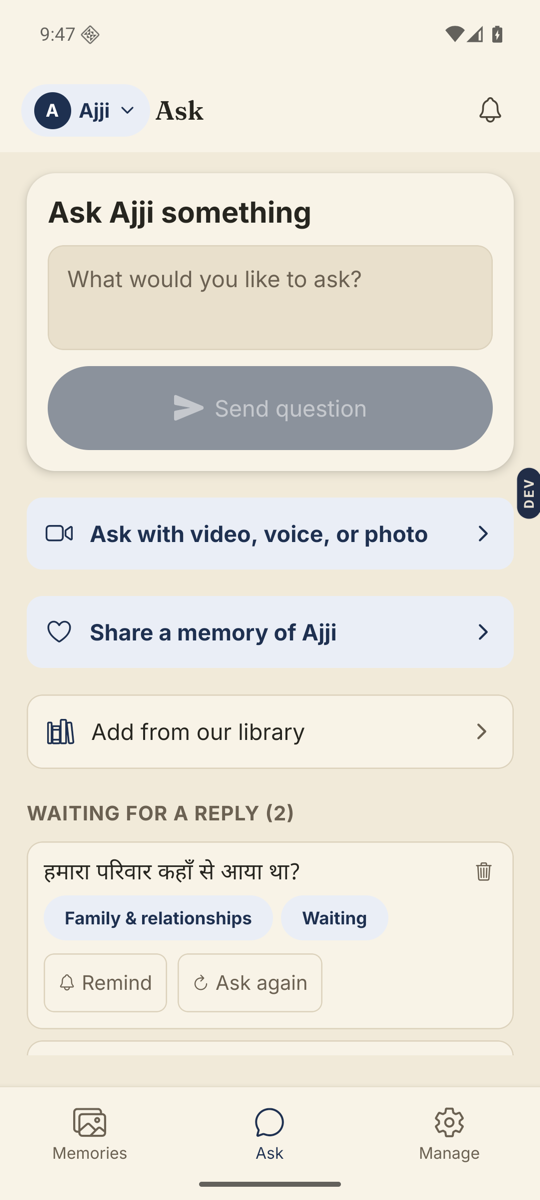
- Open the Ask tab.The middle tab at the bottom. The box at the top says “Ask Amma something”. If there is no Ask tab, your invite is watch and comment only.
- Type your question and tap Send question.Or tap “Ask with video, voice, or photo” to record it instead. Choose Video, Voice or Write at the bottom, then tap “Send to Amma”.
- Wait for the Storykeeper’s OK.Unless you are the Storykeeper, every question is checked before it reaches them.
- Follow it down the page.Questions sit under “Coming up”, then “Waiting for a reply”, then “Answered”. When the answer is shared with you, tap Watch the answer.
Good to know. They see a few questions at a time. Yours may wait under Coming up until earlier ones are answered. Tap Remind on a waiting question to send a gentle nudge. It reaches them as “Ravi is thinking of you”.
Good to know. Stuck for words? “Add from our library” has ready-made questions to pick from.
On the web. You can ask from the browser too, at app.nenapu.ai. Video, voice and photo questions need the phone app.
Stuck anywhere? Write to [email protected] — a person answers.